What’s Included
Applicant Identification Fields
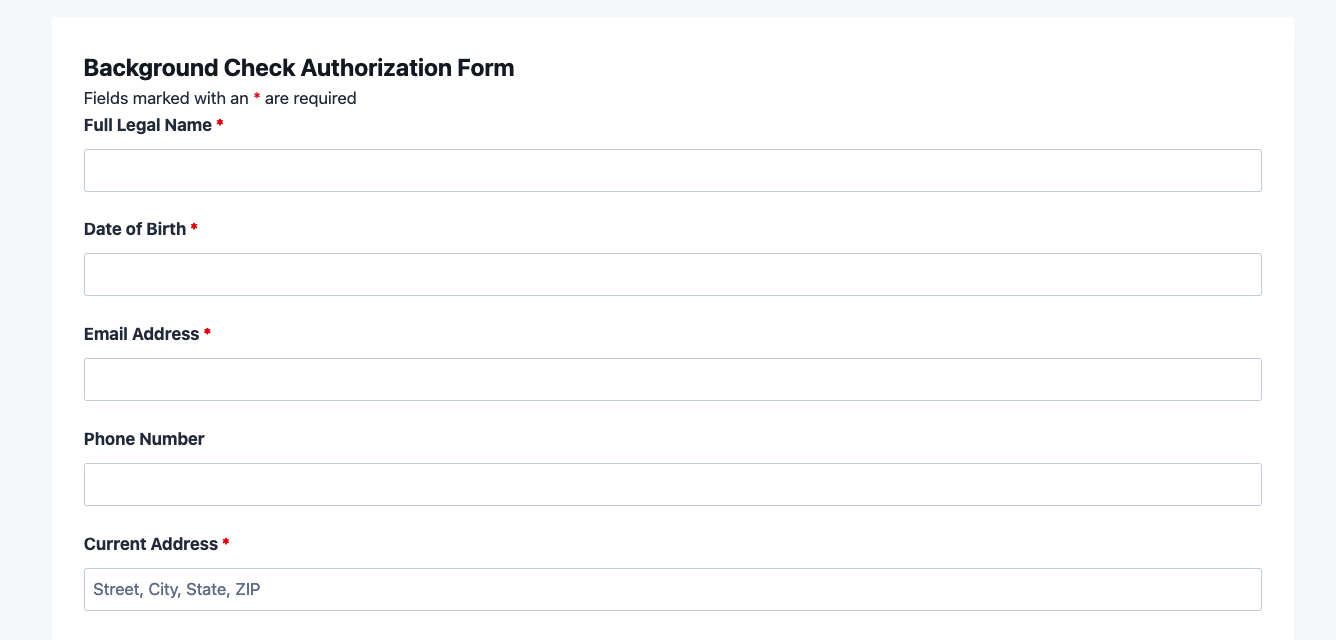
- Full Legal Name (Single Line Text): The applicant’s complete legal name as it appears on government-issued identification. Required. This field should match the name used on official records to ensure accurate search results.
- Date of Birth (Date): Applicant’s date of birth used to verify identity and run accurate records searches. Required. Used by background check agencies to distinguish individuals with similar names.
- Current Address (Single Line Text): Applicant’s current street address, city, state, and ZIP code. Required. Used to anchor address history searches for criminal and civil record lookups.
- Previous Address (Single Line Text): Most recent prior address if the applicant has lived at the current address for fewer than five years. Optional. Helps background check agencies locate records from prior jurisdictions.
- Email Address (Email): Applicant’s primary email address for sending a copy of the authorization confirmation. Required.
- Phone Number (Phone): Applicant’s contact phone number for follow-up if additional information is needed. Optional.
Authorization Scope Fields
- Position Applied For (Single Line Text): The job title, volunteer role, or tenancy type that prompted this background check request. Required. Provides context for the scope of the check and creates an audit trail linking the authorization to a specific opportunity.
- Requesting Organization (Single Line Text): The name of the employer, landlord, or organization requesting the background check. Required. Pre-populated via a Hidden field default value in most implementations, but left editable to support multi-organization setups.
- Authorization Disclosure (HTML): A read-only text block containing the standard authorization disclosure statement. Not a data-entry field; this is an HTML field that displays the legal language informing the applicant of the scope of the background investigation (identity, employment history, education, criminal records, credit history, driving records, and related records).
Consent and Submission Fields
- I Authorize This Background Check (Single Checkbox): A required affirmative consent checkbox. The applicant must check this box to confirm they have read the disclosure and consent to the background investigation. Required. Form submission is blocked if this box is not checked.
- Spam Protection (hCaptcha): hCaptcha challenge to prevent automated or bot submissions. Protects the integrity of your authorization queue and preserves applicant privacy better than reCAPTCHA alternatives.
- Submit (Submit): The form submission button, labeled “Submit Authorization” to reinforce the legal nature of the action being taken.
Total field count: 11 fields. Required fields: 7 (Full Legal Name, Date of Birth, Current Address, Email Address, Position Applied For, Requesting Organization, Consent Checkbox). Optional fields: 2 (Previous Address, Phone Number). Non-data fields: 3 (HTML disclosure block, hCaptcha, Submit button).
Automated Responses and Smart Integrations
This form is designed to do more than collect a signature. It works behind the scenes to automate confirmation emails, create an internal audit trail, and optionally connect with your HR software, document management tools, or digital recordkeeping systems. Each action fires the moment a candidate submits the background check authorization form, so nothing falls through the cracks between your inbox and your hiring workflow.
- Email Notification to Applicant: Sends a confirmation email to the address entered in the Email field. The message confirms the authorization was received, summarizes the scope of the check, and advises the applicant of their rights to request a copy of any report generated. Helps set expectations and reduces follow-up inquiries.
- Email Notification to HR Team: Sends a full submission summary to your designated HR or legal team inbox. Includes all applicant-provided fields and a timestamp, creating an internal record ready for handoff to your background check vendor.
- Success Message: Displays a clear confirmation message after submission. For example, “Your authorization has been submitted. Our team will be in touch within [X] business days.” Reduces applicant anxiety and prevents duplicate submissions.
- Redirect (Optional): Optionally redirects to a custom page with next steps, a link to your candidate portal, or an FAQ about the background check process and timeline.
- Anti-Spam Protection: hCaptcha prevents bot submissions and protects personally identifiable information from automated scraping, while maintaining a low-friction experience for real applicants.
Enhanced Functionality (Optional Add-ons)
- PDF Form Submission (Optional): Automatically generate a PDF copy of each signed background check authorization form at the time of submission. Attach the PDF to the HR team email notification for immediate filing, or store it in your document management system. Eliminates the need to manually export or print records. This is the single highest-value optional add-on for this template.
- Conditional Logic (Optional): Show the Previous Address field only when the applicant indicates they have lived at their current address for fewer than five years. Simplifies the form experience for applicants while preserving the flexibility to collect additional data when needed.
- Layout and Styles (Optional): Arrange fields in a two-column layout to reduce vertical scroll length, apply your organization’s brand colors to the form, and match the visual style of your careers page or HR portal without writing any CSS.
How Can the Background Check Authorization Form Be Used?
Written authorization is a legal prerequisite for background screening in nearly every context, including employment, tenancy, volunteering, licensing, and more. Without a signed background check authorization form, organizations risk violating the Fair Credit Reporting Act (FCRA), exposing themselves to litigation, and losing the trust of candidates who expect transparency about how their personal information will be used. A poorly designed paper form or a buried PDF attachment slows down the process, creates filing headaches, and leaves gaps in your compliance trail.
A well-structured digital background check authorization form changes the equation entirely. It captures consent precisely when it’s needed (before any search begins), stores the record automatically, and notifies your team in real time. The form works equally well as a standalone link sent via email, a page embedded in your careers portal, or a step inside a larger onboarding workflow. Explore the most common ways this template empowers different users:
HR Departments and Hiring Managers: Streamline Pre-Employment Screening
For companies that handle any volume of hiring, a standardized digital background check authorization form eliminates the inconsistency of emailing PDFs, chasing wet signatures, or manually entering applicant data into a screening portal. HR teams can embed this form on a private careers page or send a direct link to candidates after an offer is extended. The moment an applicant submits the form, the HR team receives an email with all required information, ready to hand off to their preferred background check vendor. Organizations in regulated industries such as healthcare, financial services, and childcare can use the form’s disclosure text to communicate the specific types of records that will be searched, ensuring applicants provide informed consent. The PDF Form Submission add-on makes it easy to attach a signed PDF copy to each notification email for immediate record retention.
Property Managers and Landlords: Collect Tenant Screening Consent
Before running a credit or criminal background check on a prospective tenant, landlords and property management companies must have written consent. This background check authorization form template can be adapted for tenant screening by updating the disclosure language and the “Position Applied For” field label to reflect the rental application context. Property managers can embed the form on their rental listings page or send a pre-filled link to qualified applicants. Submissions arrive instantly by email, giving property teams the documented consent they need to proceed with screening the same day. Combined with Conditional Logic, the form can show or hide address history fields based on how long the applicant has lived at their current residence, a common requirement for comprehensive tenant background checks.
Nonprofits and Volunteer Organizations: Verify Volunteers Safely
Organizations that work with vulnerable populations (children, seniors, individuals with disabilities) are often legally required to screen volunteers before allowing them to participate. A background check authorization form is the first step in that process. This template is simple enough for volunteers who may not be tech-savvy, and it can be published on a public-facing volunteer signup page or sent privately via email. The consent checkbox ensures every volunteer affirmatively acknowledges the screening before the organization proceeds. The success message can be customized to explain what happens next in the volunteer onboarding process, reducing the volume of “what happens now?” inquiries your team receives.
Staffing Agencies: Process High-Volume Candidate Authorizations Efficiently
Staffing and recruiting agencies that place candidates with multiple client organizations often need to collect background check authorization at the start of every engagement. This template can be customized to capture the name of the client company or job order number in the “Requesting Organization” or “Position Applied For” fields, creating a complete record linking each authorization to a specific placement. At high volume, the PDF Form Submission add-on becomes especially valuable: each signed authorization is automatically generated as a PDF and attached to the HR notification email, ready to be filed or forwarded to the client. No manual export, no printing, no scanning required.
Educational Institutions: Screen Faculty, Staff, and Student Workers
Universities, K-12 school districts, and private schools that hire faculty, staff, or student workers in roles involving minors or sensitive data are required by law to conduct background checks. A digital background check authorization form simplifies the process for HR and compliance teams managing hundreds of screenings per year. The form can be integrated into a broader employment application workflow or sent as a standalone link to candidates who have already completed an initial interview. The authorization form creates a clear, timestamped consent record that can be produced in the event of an audit or EEOC inquiry. For institutions using a WordPress-based HR portal or applicant tracking page, the Ninja Forms embed makes integration straightforward and code-free.
Frequently Asked Questions About the Background Check Authorization Form
Is the background check authorization form template free?
Yes, this template is completely free to download and use. It requires no paid Ninja Forms add-ons to function. The complete form (including all fields, disclosure text, consent checkbox, and email notification actions, works with the free version of the Ninja Forms plugin. Optional add-ons like PDF Form Submission and Conditional Logic are available separately if you want enhanced functionality.
Do I need coding skills to customize this template?
No coding skills are required. The Ninja Forms drag-and-drop form builder lets you add, remove, and rearrange fields visually. You can update the disclosure language directly in the HTML field, change field labels, set default values, and configure email notifications entirely through the Ninja Forms admin interface. For visual styling changes, the optional Layout and Styles add-on provides a point-and-click styler with no CSS required.
Is this background check authorization form FCRA-compliant?
This template is designed to support FCRA compliance best practices, including a standalone disclosure field and an affirmative consent checkbox. However, compliance requirements vary by state and industry, and the specific language in the authorization disclosure must be reviewed by your legal counsel before use. Ninja Forms is not a law firm and this template does not constitute legal advice. Always have your authorization form reviewed by a qualified attorney before deploying it in a hiring or screening context.
Will this form work on mobile devices?
Yes. All Ninja Forms templates are fully mobile-responsive. The background check authorization form adapts automatically to any screen size, including smartphones and tablets. Applicants can complete and submit the form on any device without any formatting issues. The optional Layout and Styles add-on gives you additional control over the mobile layout if you want to fine-tune the experience.
Can I receive a PDF copy of each submitted authorization?
Yes, with the optional PDF Form Submission add-on. When enabled, Ninja Forms automatically generates a PDF of each completed authorization at the moment of submission. You can attach the PDF to the HR team notification email, making it easy to file or forward to your background check vendor. This eliminates manual exports and is particularly valuable for organizations with high screening volumes.
Can I add conditional fields that appear based on applicant answers?
Yes, with the optional Conditional Logic add-on. For example, you can configure the Previous Address field to appear only when an applicant indicates they have lived at their current address for fewer than a specified number of years. Conditional logic rules are configured through a visual, point-and-click interface with no coding required.
What happens to the data applicants enter into this form?
Submissions are stored in your WordPress database, under Ninja Forms > Submissions, where you can view, export, or delete records at any time. The data never passes through Ninja Forms servers: it goes directly from the applicant’s browser to your WordPress database. You are responsible for handling submitted data in accordance with applicable privacy laws, including GDPR if you serve EU residents, and any data retention policies required in your jurisdiction. For GDPR compliance, Ninja Forms offers built-in GDPR tools for managing consent and data deletion requests.
Does this template work with page builders like Elementor or Divi?
Yes. Ninja Forms is compatible with all major WordPress page builders, including Elementor, Divi, Beaver Builder, Avada, and others. You can embed the background check authorization form on any page built with these tools using the Ninja Forms widget or shortcode available in your page builder’s element library. No special configuration is needed.
Can I use this template on multiple websites?
Yes. The .nff template file can be imported into any WordPress site running Ninja Forms. If you manage multiple properties, subsidiaries, or client sites, you can import and customize the template separately for each. Each instance is independent: there are no licensing restrictions on how many sites you deploy the template to.
How do I get support if I have issues with this template?
Ninja Forms offers free community support through the WordPress.org support forum. Priority email support is available to customers with an active Ninja Forms membership. You can also browse the Ninja Forms documentation library for guides on importing templates, configuring email notifications, and troubleshooting common issues.
Make it your template
Every template is ready to go live and fully customizable. Tweak a few things or renovate from the ground up. Ninja Forms gives you the tools either way.