How can the pay raise calculator be used?
Organizations and individuals often need a fast, accurate way to model compensation changes; the pay raise calculator solves that by turning inputs into clear, comparable numbers. It reduces guesswork during reviews, promotion discussions, or offer negotiations by supporting multiple raise methods and automatically converting results to hourly, weekly, biweekly, monthly, and annual figures. With built-in calculations and structured fields, users can avoid manual spreadsheets, improve accuracy, and create a repeatable process for documenting outcomes and follow-up steps.
Use the quick‑start steps below to get going today!
-
Download and Import the Template: Upload and customize labels, defaults, and required fields as needed.
- Confirm Fields:
-
Confirm Email Notifications: Create one notification for the submitter and one for the admin; personalize with merge tags for current pay, raise %, and outputs.
-
Publish & Share: Embed on an internal page or share a public link so stakeholders can run scenarios consistently.
What’s Available on the Pay Raise Calculator Template?
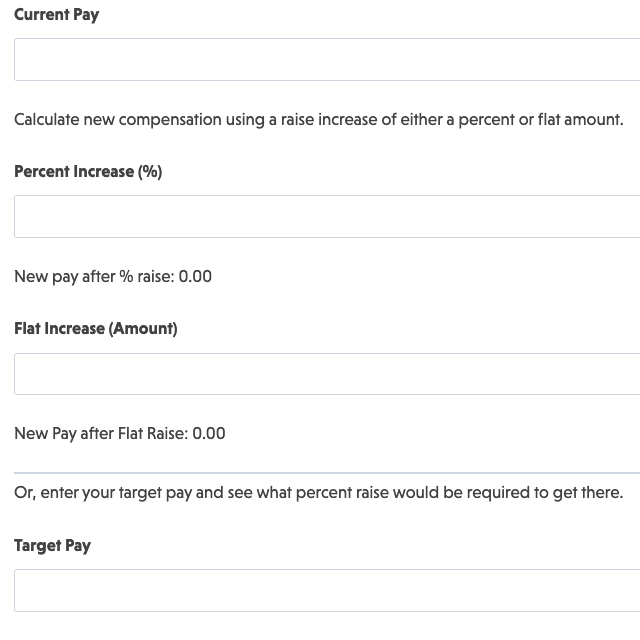
A calculation-ready structure that accepts current compensation, lets the user choose the raise method, and returns updated pay in multiple timeframes. It also includes optional contact fields, consent, and anti-spam.
Form Fields
1. Compensation Input
- Current Pay Amount (Number): Accepts numeric input for present comp; supports masks/formatting as needed.
2. Pay Raise Calculation by Raise Amount
- Percent Increase (%) (Number ): Accepts numeric input for desired percent pay increase
- New Pay (% Increase) (HTML): Displays new pay after desired percent increase
- Flat Increase (Amount) (Number): Shown when Flat mode is selected).
- New Pay (Flat Increase) (HTML): Displays new pay after desired flat increase
3. Pay Raise Calculation by Target Compensation
- Target Pay (Number): Accepts numeric input for desired target pay
- % Raise Required (HTML): Displays % raise required to achieve target pay
4. Contact
-
Name (Single Line Text )
-
Email (Email)
5. Spam Protection & Submit
-
Your choice of hCaptcha, Cloudflare Turnstile, or Google reCAPTCHA
-
Submit.
Automated Responses & Smart Integrations
This form does more than collect numbers, it confirms outcomes to users, notifies admins, and can hand results off to downstream systems for reviews, approvals, or record-keeping.
-
Email Notification: Send confirmations to the submitter and admin on submission; personalize using merge tags for each calculated output.
-
Success Message: Show a clear on-screen summary and next steps after submission.
-
Redirect: Optionally redirect to a “Compensation Review” page or resources on salary band policies.
-
Record Submission: Store results for later reporting and HR audits.
-
GDPR Requests (Optional): Include Export Data or Delete Data request actions when operating in regulated environments.
A smart, calculation-driven form like this helps standardize raise discussions, cut down on manual spreadsheet work, and enable transparent, data-driven decisions.
Get started today and transform your compensation review workflow with clarity and professionalism!
Make it your template
Every template is ready to go live and fully customizable. Tweak a few things or renovate from the ground up. Ninja Forms gives you the tools either way.