What’s Included
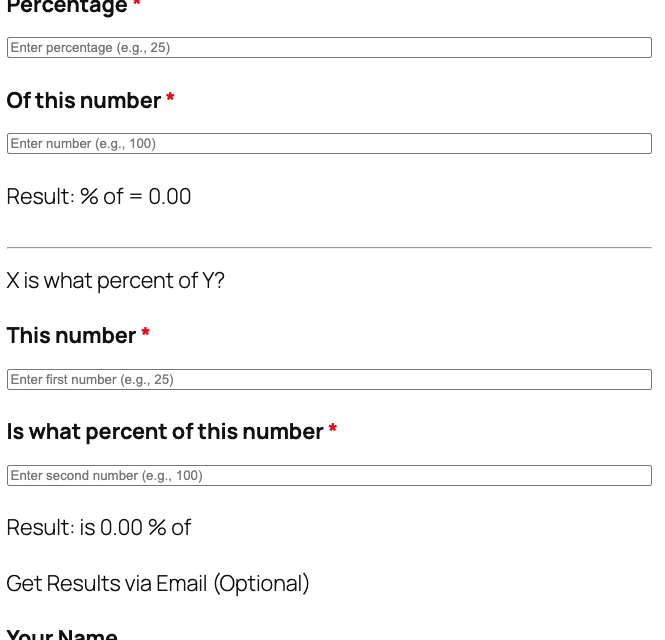
This template provides a streamlined percentage calculation tool focused on the two most essential calculations. The form is organized into two clear sections, each handling a specific calculation type using Ninja Forms’ free built-in Calculations feature. Results display instantly as users type, and the clean, intuitive design ensures users of all technical levels can quickly get the answers they need without confusion.
Section 1: “What is X% of Y?” Calculation
- Percentage Field (Number): Enter the percentage you want to calculate (e.g., 25 for 25%). Required field with validation to ensure numeric input and helpful placeholder text.
- Of This Number Field (Number): Enter the base number you’re calculating the percentage of (e.g., 100). Required field that accepts decimal values for precise calculations.
- Result Display (HTML): Shows the calculated value in clear, readable format—for example, “25% of 100 = 25.” Updates in real-time as you type, rounded to two decimal places.
Section 2: “X is what percent of Y?” Calculation
- This Number Field (Number): Enter the first number (e.g., 25). Required field with validation and placeholder guidance.
- Is What Percent of This Number Field (Number): Enter the second number you’re comparing against (e.g., 100). Required field that accepts decimal values.
- Result Display (HTML): Shows the calculated percentage in clear format—for example, “25 is 25% of 100.” Updates instantly, rounded to two decimal places.
Optional Lead Capture Section:
- Your Name (Single Line Text): Collects the user’s name for personalized follow-up and lead tracking. Completely optional field with clear labeling.
- Your Email (Email): Captures the user’s email address to send calculation results, newsletters, or follow-up information. Optional field with built-in email validation.
- Anti-Spam Protection (hCaptcha): Protects the form from bot submissions while maintaining excellent user experience and privacy protection. Not required, loads only when needed.
- Submit Button (Submit): “Get Results via Email” button triggers form submission if users want to receive results by email.
This template uses Ninja Forms’ free built-in Calculations feature to perform both percentage calculations in real-time. The calculations use standard percentage formulas: “What is X% of Y?” uses (percentage × number ÷ 100), and “X is what percent of Y?” uses (first number ÷ second number × 100). Both calculations display results rounded to two decimal places for readability.
Automated Responses and Smart Integrations
This form is designed to provide instant calculation results while optionally collecting user data to build your contact list and understand your audience. Behind the scenes, it can automate confirmations, deliver detailed calculation summaries via email, and integrate with marketing tools for seamless follow-up and relationship building.
Core Actions (included in every installation):
- Email Notification: Sends a confirmation email to the user with their complete calculation results and a copy to your team with submission details for follow-up. Customize the email template to include your branding and any additional resources or offers.
- Success Message: Displays a clear thank-you message with next steps, such as checking email for the detailed calculation summary, exploring related resources, or scheduling a consultation if you’re offering professional services.
- Redirect: Optionally redirects users to a custom page with additional calculators, recommended articles, service information, or scheduling tools to continue their journey on your site.
- Anti-spam Protection: Uses hCaptcha to prevent bot entries while maintaining excellent user experience and protecting user privacy—far superior to older CAPTCHA solutions.
Enhanced Functionality (Optional):
Based on this template’s use case, these optional add-ons can enhance functionality when naturally relevant:
- Conditional Logic (Optional): Create smart form behavior like showing additional fields based on calculation results, presenting targeted follow-up questions, or customizing the user experience based on their inputs. Conditional Logic makes the form smarter and more personalized.
- PDF Form Submission (Optional): Generate professional PDF reports of calculation results that users can download or receive via email—perfect for financial professionals, educators, or anyone wanting to provide formal documentation. PDF Form Submission adds a professional touch.
- Layout & Styles (Optional): Create a polished, multi-column layout that displays input fields and results side-by-side, customize colors and fonts to match your brand perfectly, or design a premium calculator experience without coding. Layout & Styles enhances visual appeal.
- Email Marketing Integration (Optional): Automatically add users to your email lists when they submit the calculator, trigger targeted email campaigns with relevant content, or nurture leads with automated follow-up sequences. Connect with Mailchimp, ActiveCampaign, Constant Contact, or other supported platforms.
- CRM Integration (Optional): Sync calculator users with your CRM to track engagement, set follow-up reminders for high-value prospects, and organize your sales pipeline. Connect with OnePageCRM to automatically create new leads and organize follow-up tasks. Other supported CRMs include HubSpot, Salesforce, Zoho, and Insightly.
- Zapier and Webhooks (Optional): Connect calculator submissions to thousands of apps and services—add rows to Google Sheets for tracking, create tasks in project management tools, send Slack notifications to your team, or integrate with custom applications. Use Zapier for easy connections or Webhooks for custom integrations.
How Can the Percentage Calculator Be Used?
Percentage calculations are fundamental to countless business, educational, and personal scenarios. Whether you’re analyzing financial performance, setting pricing strategies, teaching mathematical concepts, or making everyday decisions, understanding percentages is essential. However, many people struggle with percentage formulas or want quick, accurate results without pulling out a calculator or spreadsheet.
This percentage calculator template solves that problem by providing instant, accurate calculations in an easy-to-use web form. Unlike generic calculator websites where you lose the user after they get their answer, this WordPress-hosted tool keeps visitors on your site, lets you capture their information for follow-up, and positions you as a valuable resource. Explore the most common ways this template empowers different users:
Financial Advisors: Client Education and Portfolio Analysis
Financial advisors and wealth managers use percentage calculators daily to illustrate investment returns, compare portfolio performance, calculate compound interest effects, and demonstrate the impact of fees on long-term growth. Instead of manually calculating percentage changes during client meetings or relying on external websites, embed this calculator on your site’s resources page. Clients can calculate the percentage increase in their portfolio values, determine what percentage of their goals they’ve achieved, or understand the percentage impact of different investment strategies. The optional email capture allows you to follow up with users exploring financial calculations, offering consultations or educational content. Connect with OnePageCRM to automatically create leads and set follow-up reminders for prospects researching investment returns.
Retail and E-commerce: Pricing Strategy and Discount Planning
Retail managers, e-commerce operators, and pricing specialists constantly work with percentages—calculating markup percentages, determining optimal discount rates, analyzing profit margins, and comparing price changes across seasons. This calculator helps internal teams quickly determine what percentage discount to offer, calculate the final price after a percentage reduction, or figure out what markup percentage achieves desired profit margins. Share it with wholesale buyers to help them calculate their margins, or embed it on a B2B portal where retail partners can instantly compute their percentage profits on your products. For customer-facing use, add the calculator to your shopping resources page so customers can determine savings percentages or compare prices. The Layout & Styles add-on can create a branded, professional calculator experience that matches your e-commerce design.
Real Estate Agents: Commission and Investment Calculations
Real estate professionals use percentage calculations for commission splits, down payment percentages, appreciation rates, cap rate calculations, and return on investment analysis. This template enables agents to provide a valuable tool for potential clients—buyers can calculate what percentage of a home’s price their down payment represents, sellers can determine the percentage appreciation of their property, and investors can compute percentage returns on rental properties. Embed the calculator on your real estate website’s resources section, add your branding, and include optional fields to capture user information. When someone calculates commission percentages or investment returns, you can follow up with market reports, listing alerts, or consultation offers. The calculator positions you as a helpful resource while generating qualified leads interested in real estate transactions.
Teachers and Educators: Interactive Math Learning Tool
Mathematics teachers, tutors, and educational websites use percentage calculators as teaching aids to help students understand percentage concepts, verify their homework answers, and develop intuition for percentage relationships. Unlike simply giving students answers, this interactive tool lets them experiment with different values, see immediate results, and understand how percentages work in real-world scenarios. Embed the calculator on your educational website, course platform, or tutoring service site. Students can practice calculating percentage increases for population growth problems, percentage decreases for depreciation exercises, or what-percent calculations for test score analysis. The instant feedback helps reinforce learning. If you’re building an educational platform, consider adding Conditional Logic to create guided learning paths based on the calculation types students choose.
Small Business Owners: Financial Analysis and Reporting
Entrepreneurs, small business owners, and freelancers need to calculate percentage changes in revenue, determine percentage allocation of budgets, analyze expense percentages relative to income, and track growth metrics. This calculator provides a quick reference tool for making business decisions—calculate the percentage increase in sales from last quarter, determine what percentage of revenue goes to overhead costs, or figure out the percentage change in customer acquisition costs. Host it on your internal business portal for team use, or if you provide business consulting services, offer it as a free tool on your website to attract potential clients. When business owners use your calculator, optional lead capture fields let you follow up with relevant consulting services, financial planning resources, or business growth strategies.
Frequently Asked Questions About the Percentage Calculator
Is the percentage calculator template completely free?
Yes, the percentage calculator template is 100% free to download and use. The template works with the free version of Ninja Forms and uses only the built-in Calculations feature, which is included in the core plugin at no cost. You don’t need any paid add-ons for the calculator to function—all calculation formulas, field configurations, and basic actions are included. You can customize the template, use it on unlimited websites, and process unlimited submissions without paying anything. Optional add-ons like Conditional Logic, PDF Form Submission, or Layout & Styles can enhance functionality if desired, but they’re not required. Unlike many calculator plugins that charge monthly fees or require expensive licenses, this template gives you full ownership and control with zero recurring costs.
Do I need coding skills to customize this calculator?
No coding skills required whatsoever. Ninja Forms provides an intuitive drag-and-drop form builder that lets you customize every aspect of the calculator through a visual interface. You can change field labels by clicking and typing, adjust calculation formulas using the calculations editor with simple point-and-click field selection, modify the form layout by dragging fields into different positions, customize colors and styling through the settings panel, and configure email notifications using merge tags and templates—all without touching a single line of code. Even advanced customizations like adjusting decimal precision, adding conditional logic rules, or creating multi-step calculations can be done through user-friendly menus and options. The only time you might use code is if you want to add highly custom styling, but even that is completely optional.
Will this calculator work on mobile devices?
Absolutely. The percentage calculator template is fully mobile-responsive and works flawlessly on smartphones, tablets, and desktop computers. Ninja Forms automatically adapts the form layout to fit any screen size, ensuring number input fields are easy to tap and type on touchscreens, results display clearly without horizontal scrolling, the hCaptcha verification works smoothly on mobile browsers, and the entire calculator loads quickly even on slower mobile connections. The mobile experience has been optimized for usability—users can complete calculations on the go without frustration. This is especially important since many users search for “percentage calculator online” from their phones when they need quick answers while shopping, at work, or making decisions on the move.
Can I integrate the calculator with my CRM or email marketing tool?
Yes, Ninja Forms integrates with virtually all major CRM platforms and email marketing services through official add-ons. For CRM integration, connect with OnePageCRM to automatically create leads and set follow-up reminders, or integrate with HubSpot, Salesforce, Zoho, Insightly, and others. For email marketing, connect with Mailchimp, ActiveCampaign, Constant Contact, AWeber, Kit, and many more. These integrations automatically add calculator users to your contact lists, trigger targeted email campaigns, and sync all form data to your CRM for follow-up tracking. You can also use Zapier to connect with over 4,000 apps or Webhooks for custom integrations.
How accurate are the percentage calculations?
The calculations are completely accurate and use standard mathematical formulas for both percentage operations. The template calculates “What is X% of Y?” as (percentage × number ÷ 100) and “X is what percent of Y?” as (first number ÷ second number × 100). All calculations use JavaScript’s native math operations for precision and speed. Results are displayed with two decimal places by default for readability, though you can adjust the decimal precision through the calculation settings if you need more or fewer decimal places. The calculations happen in real-time as users type, providing instant feedback with no delays or errors.
Can I add more calculation types or customize the formulas?
Absolutely. The template is fully customizable, and you can add as many calculation types as you need using Ninja Forms’ built-in Calculations feature. Common additions include percentage change with direction indication (increase vs. decrease), compound percentage calculations for multi-year projections, reverse percentage calculations (find the original price before a discount), percentage points vs. percentage change for statistical analysis, and margin vs. markup percentage calculations for retail pricing. You can modify existing formulas by clicking on the calculation in the form builder, editing the formula using the calculation editor’s visual field picker, adjusting operators and mathematical functions, and saving your changes. The calculation editor supports addition, subtraction, multiplication, division, parentheses for order of operations, and common mathematical functions. Learn more about working with calculations in the documentation.
What happens to the data users enter into the calculator?
Data handling depends on how you configure the form actions. By default, calculation values entered by users are processed in real-time in their browser using JavaScript—no server submission required unless the user clicks the submit button. If you enable the optional name and email fields and users submit the form, Ninja Forms stores the submission data in your WordPress database where you can view, export, or delete it at any time. You have complete control over data retention and can configure GDPR-compliant data handling including setting automatic deletion schedules, allowing users to request data export or deletion, flagging fields as Personally Identifiable Information (PII), and disabling submission storage entirely if you prefer. All data stays on your WordPress server—Ninja Forms never stores user data on external servers. You can also configure email notifications to receive submission details without storing data in the database.
Does this calculator work with page builders like Elementor or Divi?
Yes, the percentage calculator works seamlessly with all popular WordPress page builders including Elementor, Divi, Beaver Builder, WPBakery, Oxygen, Bricks, and others. Each page builder has its own method for adding forms. In Elementor, add a Shortcode widget and paste your form shortcode. In Divi, add a Code module and insert your shortcode. In Beaver Builder, use the HTML module with your shortcode. Most page builders also have dedicated Ninja Forms modules or widgets that let you select your form from a dropdown without dealing with shortcodes. The form styling automatically adapts to your page builder’s design, though you can further customize the appearance using the Layout & Styles add-on if you want pixel-perfect design control. The calculator’s responsive design ensures it looks great in any page builder layout, whether you place it in a full-width section, sidebar, or multi-column layout.
Can I use this template on multiple websites?
Yes, you can use the percentage calculator template on unlimited websites without any restrictions. Once you download the template file, you own it and can install it on as many WordPress sites as you want—your business site, client sites if you’re an agency, multiple niche sites if you run a portfolio of properties, or test sites for development purposes. Simply import the .nff file into Ninja Forms on each site just like you did on the first installation. Each site can have its own customized version of the calculator with different styling, calculation types, or integration settings. The free Ninja Forms plugin is also licensed for unlimited site use, so there are no restrictions on how many sites you can install it on. This makes it perfect for agencies managing multiple clients, developers building sites for customers, or entrepreneurs running several online properties.
How do I get support if I have issues with the calculator?
Ninja Forms provides extensive support resources to help you succeed with the percentage calculator template. Start with the comprehensive documentation library that covers form building, calculations, field configuration, and troubleshooting. The documentation includes step-by-step guides, video tutorials, and detailed explanations of all features. If you can’t find your answer in the docs, the Ninja Forms support team is available to help—free version users can get support through the WordPress.org forums, while paid add-on customers receive priority email support. The Ninja Forms community forum is also a great place to ask questions, share tips, and learn from other users. For template-specific questions about calculation formulas, field customization, or integration setup, detailed comments in the template file itself provide guidance. And if you’re working with a web developer or agency, they can easily customize the template to your exact specifications using standard WordPress and Ninja Forms APIs.
Make it your template
Every template is ready to go live and fully customizable. Tweak a few things or renovate from the ground up. Ninja Forms gives you the tools either way.